How to track walking distance on iPhone
By Thriving Bird · Updated
Get BirdRunner free on the App Store.
To see how far you walked on iPhone, open the Health app, tap Browse, then Activity, then Walking + Running Distance. Your iPhone counts it automatically while you carry it, and you can switch between a day, week, month, or year. To measure one particular walk with its route, record it as a GPS workout with Apple Watch or a walking app like BirdRunner.
See your daily distance in Apple Health
- Open Health on your iPhone.
- Tap Browse, then Activity. On iOS versions with a Search tab instead, search for “walking”.
- Tap Walking + Running Distance.
- Choose D, W, M, 6M, or Y above the chart to see a day, week, month, six months, or a year. Open Steps in the same category for a step count.
Walking + Running Distance is a daily total, not a log of separate walks. It combines walking and running, and it can include readings from your iPhone, Apple Watch, and apps you allow. If the total looks different from another app, check Data Sources & Access on that page to see where the readings came from. Apple explains sources and settings in its Health data guide.
Measure one walk with Apple Watch
- Open the Workout app on your Apple Watch.
- Turn the Digital Crown to Outdoor Walk and start it.
- When you finish, end the workout on the watch.
- On your iPhone, open Fitness, tap Sessions, and tap the walk to see its distance, time, and route.
Recent iOS versions can also start a workout in the Fitness app on iPhone alone. Apple's Fitness guide for iPhone lists the steps and what your version supports.
Record a GPS walk with its route in BirdRunner
BirdRunner is a free run & walk coach for iPhone. You don't need an Apple Watch or a training plan to record a walk.
- On Today, find Just go and tap Walk.
- For an outdoor route, leave GPS on in You → Run and walk settings. Allow location While Using the App when asked, with Precise Location on.
- Carry your iPhone during the walk. The timer shows time and, with GPS available, distance and pace. Recording can continue with the phone locked.
- Finish the activity to save it to your journal. Open it from Progress to see its distance, pace, and route on a map, and compare walking distance and time across weeks.
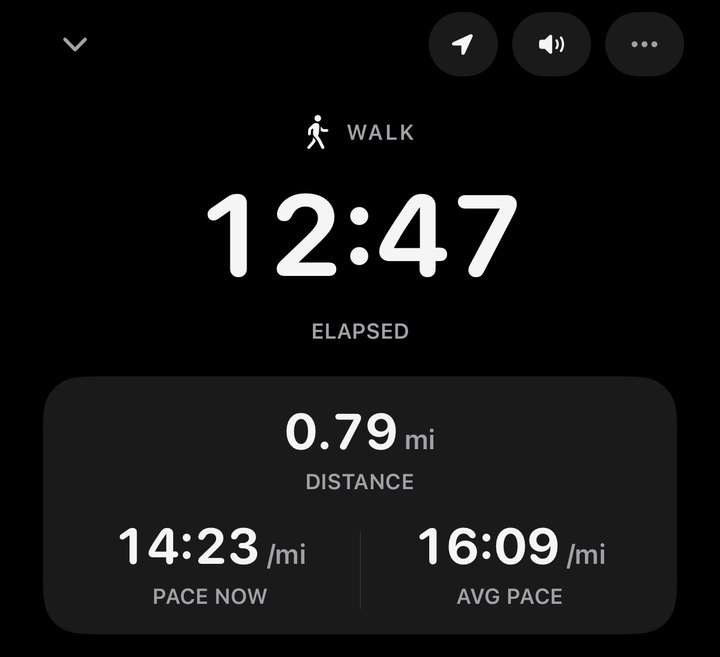
If the timer says Location is off or Precise location is off, tap Open Settings on the timer and check BirdRunner's location permission and Precise Location. The timer keeps running without location, and you can enter the distance afterward if you know it. A treadmill session keeps GPS off. Our BirdRunner recording help covers permissions and recording with the screen locked.
A plan is optional. You can choose No plan during setup and record walks whenever you go, or pick a walking or walk and jog plan later. See how to start without a training plan.
Why walking distance can be off
- The phone stayed behind. Health only counts what your iPhone or watch sees. Steps taken while the phone sits on a desk or in a bag you put down are missed. Make sure Fitness Tracking is on in Settings › Privacy & Security › Motion & Fitness.
- Stride is estimated. Without GPS, distance comes from your steps and an estimated stride length, so it can drift for people with a short or long stride. Keep your height in Health up to date. Apple Watch learns your stride over outdoor walks and runs with GPS.
- GPS needs open sky. Tall buildings, tree cover, and indoor spaces can make a route wander or cut corners. With Precise Location off, a GPS app gets only a rough location and can't measure a route well.
- Two kinds of number. A recorded route measures the path you traveled on one walk. Health's daily total is an estimate of all your movement that day. They rarely match exactly.
Questions
How do I switch walking distance between kilometers and miles?
Apple Health follows your iPhone's measurement system in Settings › General › Language & Region. Some iOS versions also let you pick a unit near the bottom of the Walking + Running Distance page in Health. In BirdRunner, choose Miles or Kilometers in You › Run and walk settings › Distance units.
How do I see how far I walked on a past day?
In Health, open Walking + Running Distance and choose D, W, M, 6M, or Y above the chart. Touch and hold the chart to read a single day, or scroll down to Show All Data for a day by day list.
Can my iPhone track walking distance without an Apple Watch?
Yes. iPhone counts steps and walking distance on its own while you carry it, as long as Fitness Tracking is on in Settings › Privacy & Security › Motion & Fitness. To record one walk with its route on iPhone alone, use a GPS walking app such as BirdRunner.
Why is my walking distance different in two apps?
Health's daily total is estimated from your movement all day and can combine iPhone, watch, and app data. A recorded walk measures only that walk, usually with GPS. Check Data Sources & Access on the metric in Health to see which source it uses.
Train safely. BirdRunner gives general fitness guidance. It isn't medical advice and doesn't diagnose, treat, or prevent any condition. Talk to a doctor before you start a new plan or step up your training, especially if you have a heart, lung, or other health condition or an injury, are pregnant, or haven't been active lately. Stop and get help right away if you feel chest pain or pressure, faintness, a racing or irregular heartbeat, or unusual shortness of breath. In heat or humidity, slow down, drink water, and stop if you feel sick or confused. Watch traffic, not your screen, and keep audio low enough to hear around you.
About BirdRunner
BirdRunner is a free run & walk coach for iPhone made by Thriving Bird. Track GPS distance and pace, use optional training plans, and keep your journal on your device. No account, tracking, or analytics.