 Measure Lot
Measure a yard, lot or field on a map
Tap the corners on a satellite map, or walk around the edge with your iPhone. Measure Lot shows the area in acres, square feet and more, with the distance around it.
Free on the US App Store

Free to download, with 3 free measurements. For iPhone with iOS 17 or later.
After that, Unlimited Measuring is $14.99 once (US price).
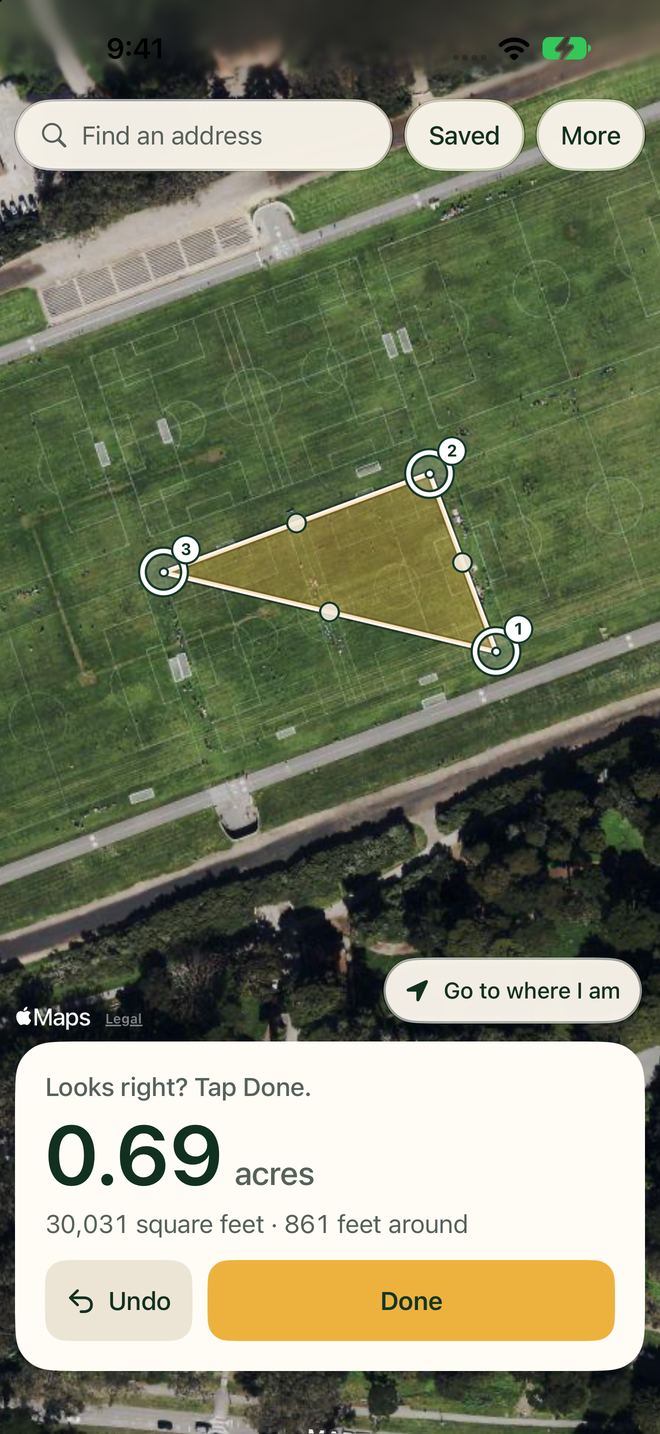
0.69 acres
30,031 square feet
861 feet around
How to measure acreage on a map
A card on the map always says what to do next.
The card says Find your place.
Type an address, or tap Go to where I am. Zoom in on the yard, lot or field you want to measure.
Then Tap each corner, going around the edge.
Drag a corner to move it, or tap it to keep it or remove it. Undo sits beside Done.
From the third corner Looks right? Tap Done.
The size shows in big numbers with the distance around it. Tap Done and give it a name.
Or measure a length
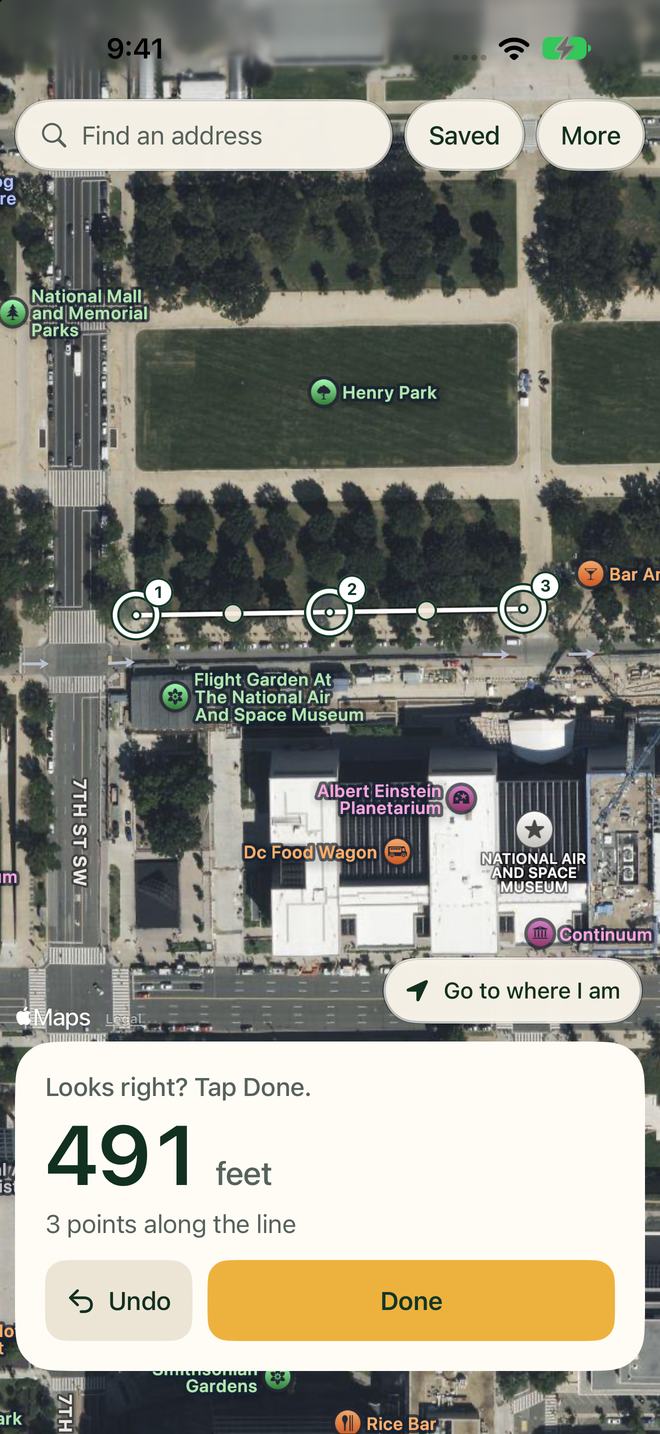
Tap the points along a fence, a curb or a string of lights. Lengths show in feet, yards, meters, miles and kilometers.
Tap Change beside Measuring an area and choose A length: a fence or an edge. Every area shows the distance around it too.
- Or walk the edge with GPS
- Tap More, then Walk around it, and drop a corner at each turn. The screen shows whether the GPS signal is strong, fair or weak. Keep it open while you walk. Stay on land you're allowed on, and watch where you walk, not the screen.
- The size, in every unit
- Acres, square feet, square yards, square meters and hectares, all at once, with the distance around. Feet, yards, meters, miles and kilometers for lengths.
From the size to a quote
Made for quoting lawn care, snow removal, paving and fencing, and other outdoor jobs. It's for homeowners and gardeners too.
30,031 sq ft times $0.12 equals $3,603.72
An example: the sample field above at a rate of $0.12 a square foot.
Save a measurement with a name, then add a note and your rate, like $0.12 a square foot or $3.50 a foot, to see the total. The estimate sheet is one page with the outline and the numbers. Printing it or sending the PDF needs the unlock.
What it costs
| Free | Unlimited Measuring | |
|---|---|---|
| Measurements | 3 in total | Unlimited |
| Print, save or share the estimate sheet PDF | No | Yes |
| Open, edit and share your saved numbers as text | Yes | Yes |
| Price | Free to download | $14.99 once |
That's 3 in total on this phone, not 3 a month. A measurement counts when a new shape first has an area (the third corner) or a length (the second point). Deleting one doesn't give it back. The map shows how many free measurements are left.
Unlimited Measuring is a one-time purchase of $14.99 in the US. There is no subscription and no account to make.
US price. The App Store shows the price before you buy. Apple handles payments and refunds.
Your measurements stay on your iPhone
There is no account, and the app sends nothing to us. Location is optional and never sent to us: the app asks for it only when you tap Use where I am, Go to where I am or Walk around it, and uses it only while the app is open.
Address search, place names and the map come from Apple Maps.
Measure Lot privacy policy › Measure Lot terms of use › Measure Lot help ›
Before you order materials or bid a job
- The area math is tested on known sizes: a football field, a square mile and a hectare. Your result depends on the map picture and where you tap, so check it before you order materials or bid a job.
- Map pictures can be off, sometimes by many feet, or out of date. Trees and hills hide edges.
- Areas are measured flat. A steep roof or a hillside has more surface than its outline, so it will read low.
- For the best result, zoom in before you tap each corner.
This is an estimate from a map or GPS. It is not a legal survey. Don't use it to settle a property line.
Questions
How do I measure acreage on a map?
Open Measure Lot and type an address, or tap Go to where I am. Zoom in, then tap each corner on the satellite map, going around the edge. From the third corner the size shows in big numbers, in acres, square feet and more, with the distance around it. When it looks right, tap Done and give it a name.
Can I measure the square footage of a yard or lawn?
Yes. Every area shows in acres, square feet, square yards, square meters and hectares at once, so you can read the size of a yard, lawn or field in the unit you need. Your region sets which unit comes first.
Can I measure land by walking around it with GPS?
Yes. Tap More, then Walk around it, and tap Start. Walk around the edge and tap Drop a corner here at each corner, then tap Finish when you are back where you began. The screen shows whether the GPS signal is strong, fair or weak. Keep the screen open while you walk. Stay on land you're allowed on, and watch where you walk, not the screen. GPS is weaker under trees and near buildings, so tapping the map can work better there.
Can it measure fence length or the distance around a field?
Yes. Every area also shows the distance around it. To measure a fence line, curb or string of lights on its own, tap Change beside Measuring an area and choose A length: a fence or an edge, then tap the points along it. Lengths show in feet, yards, meters, miles and kilometers.
How much does Measure Lot cost?
Measure Lot is free to download, with 3 free measurements in total. After that, Unlimited Measuring is a one-time purchase of $14.99 in the US, with no subscription. It adds unlimited measurements and lets you print, save or share the estimate sheet PDF. Opening, editing and sharing your saved numbers as text is always free.
Why does a roof or hillside measure small?
Measure Lot measures flat, as seen from above. A sloped roof or a hillside has more surface than its outline from above, so it reads smaller than it really is. Allow for the slope in your quote.
Does Measure Lot need an account or my location?
There is no account. Location is optional: the app asks for it only when you tap Use where I am, Go to where I am or Walk around it, uses it only while the app is open, and never sends it to us. Address search, place names and the map come from Apple Maps, so you need the internet to load the map and to search.
Get Measure Lot on iPhone
Free to download, with 3 free measurements. Requires iOS 17 or later.
Questions first? Email us; we usually reply within two business days.