
Thriving Bird
Let’s talk.
Questions about an app, a website, or a project? Get in touch.
Email Thriving Bird
For a website project, tell us what your business does, link your current site if you have one, and share what you want to improve.
For app support, include the app name, device, and what happened. Please leave out passwords and sensitive personal information.
BirdRunner help
Where can I find running safety tips?
Open You → Running safety for tips on evening runs, hydration, getting to know a route, and making a safety plan. The tips are available offline.
Use a headlamp and reflective gear after dark. Try new routes in daylight first. Plan water stops, bring a charged phone, and tell someone you trust where you're going and when you expect to return. A personal alarm is an option. If you choose pepper spray, check local laws and venue rules and learn safe handling first.
The page links to RRCA runner safety guidance, CDC heat guidance, and Apple's Emergency SOS guide. BirdRunner does not monitor your safety, share your live location, or call for help.
How do I report a problem or suggest something?
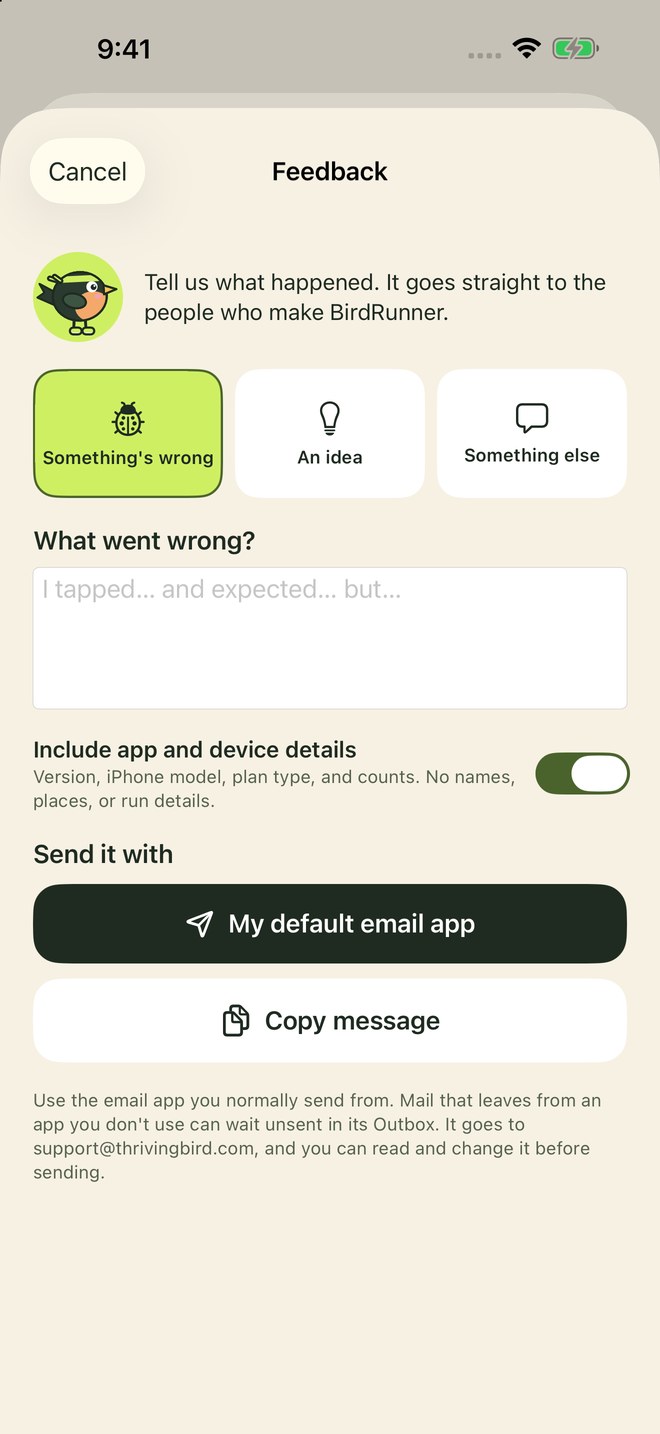
Go to You → Feedback and rating and tap Report a problem or Share an idea. Write your note, then pick the email app you normally use: Gmail, Outlook, Apple Mail, or your default email app. BirdRunner fills in the address, your note, and app details. You can change or remove anything before you press Send, or tap Copy message and paste it into any email to support@thrivingbird.com.
Choose the app you actually send email from. Mail sent from an app you don't use can wait unsent in its Outbox.
How do I add the widgets?
Touch and hold your Home Screen or Lock Screen, tap Edit or Customize, then add a widget and choose BirdRunner. There are widgets for your next session, your training week, the weather, steps, the race countdown, and a quick start. They update when BirdRunner does. The steps widget also updates when your iPhone checks your steps in the background, and the weather widget gets a new forecast about once an hour.
Where does the weather come from?
Tap Show weather on Today, or turn on Weather on Today in You → Look and text size. BirdRunner asks for your location While Using the App, rounds it to about 5 km (3 miles), and gets the forecast for that area from Open-Meteo, a free weather service. Nothing else is sent. The card shows now, today's high and low, the next few hours, and the best time to run, picked for a dry, comfortable hour in daylight. Temperatures follow your iPhone's setting in Settings → General → Language & Region → Temperature.
If the card says location is off, allow it in Settings → Apps → BirdRunner → Location. Turning weather off deletes the saved forecast.
How do I bring in runs from my Garmin watch?
In BirdRunner, go to You → Garmin watch and follow the four steps. In short: in Garmin Connect on your iPhone, open More → Settings → Connected Apps → Apple Health and turn on Workouts, then tap Check in BirdRunner. From then on, each run Garmin Connect syncs lands in your journal by itself, usually within minutes, and ticks off the planned session it matches. If one is slow to arrive, open BirdRunner or tap Import now.
Garmin's Apple Health export includes date, distance, and time, but not GPS routes. For a map and splits, open the activity on the Garmin Connect website, choose the gear icon, and export it as GPX or TCX. Then in BirdRunner, go to You → Garmin watch → Import GPX or TCX files. If the run is already in your journal, BirdRunner adds the map to it instead of adding a copy.
If you wear a Garmin and an Apple Watch together, or another app such as Strava also saves your runs to Apple Health, BirdRunner avoids duplicate runs. Copies with your saved notes or routes are kept so those details are not lost.
Does BirdRunner work with Apple Watch?
Yes, without a separate watch app. Record a walk or run with the Workout app on your Watch. It syncs to Apple Health, and BirdRunner adds it to your journal and ticks off the session it matches. To also bring in the route, heart rate, calories, and other readings your Watch saved, go to You → Apple Watch → Connect Watch data.
Turn on Send planned sessions to Watch in the same place to put the coming week's sessions in the Workout app, with warmups, intervals, and cooldowns. During a run recorded on your iPhone, the timer can also show in your Watch's Smart Stack. Voice cues stay on the iPhone.
Which iPhones and Watches does BirdRunner support?
BirdRunner needs iOS 17 or later, which means iPhone XS, XR, or iPhone SE (2nd generation) and newer. It's laid out for every screen size from iPhone SE to Pro Max, including large text. We haven't tested it on iPhone Duo yet.
Any Apple Watch that saves workouts to Apple Health works for importing runs. Sending planned sessions needs watchOS 10 or later, and the Smart Stack timer needs iOS 18 and watchOS 11 or later.
I imported from Apple Health but my runs are missing.
Check that BirdRunner can read your data in Settings → Privacy & Security → Health → BirdRunner. Turn on Workouts and Walking + Running Distance. For Watch routes and readings, use You → Apple Watch → Connect Watch data, then allow the types you want. BirdRunner imports walking and running workouts from the past year, including indoor sessions. Workouts without distance are saved with time only. Import again after changing access.
iOS doesn't tell apps when read access is off, so an empty import usually means access needs turning on.
Which permissions does BirdRunner use?
Right after you build your first plan, one screen explains each one: Apple Health, Motion & Fitness, Notifications, and Location. Tap Continue and your iPhone asks about each in turn, so you choose. BirdRunner works without them. For example, a run without Location records your time only. To see that screen again, go to You → Help and tips → Set up permissions. To change an answer later, open the iPhone Settings app → Apps → BirdRunner, or for Apple Health, Settings → Health → Data Access & Devices.
For accurate distance on runs, keep Precise Location on.
Why don't my steps match the Health app exactly?
BirdRunner reads the same step total the Health app shows, with iPhone and Apple Watch steps counted once. Your iPhone sends its steps to Apple Health in batches every few minutes, so BirdRunner also reads the iPhone's own step counter and shows whichever is further along. Tap Refresh on the steps card, or pull down on Today, for the latest count.
If steps stay at zero, allow BirdRunner to read Steps in Settings → Health → Data Access & Devices, and allow Motion & Fitness in Settings → BirdRunner.
Steps typed into the Health app by hand aren't counted, so a goal can't be met by typing in a number.
Why didn't an activity count toward a bird?
Birds are meant to be earned out on your feet. An activity counts when BirdRunner timed or recorded it, or it came from Apple Health, a watch, or a GPX or TCX file, and the distance birds (like the swan and the phoenix) need a distance that was measured by GPS or a watch. These still show everywhere else, just not toward birds: entries typed in by hand, an activity whose date was changed afterward or that was recorded while the iPhone's clock was changed, anything faster than anyone has ever gone on foot (a car ride left recording, for example), and a planned session stopped before half of it was done.
Step birds count days with at least 5,000 steps, however low the goal is set. Activities you had before October 13, 2026 count as they always did, and birds you've earned stay yours.
Can I get step updates during the day?
Yes. In You → Notifications, turn on When I reach my goal for a once-a-day alert, and Check-ins for a quiet note with your steps so far and how many are left. Choose every hour, 2, 3, or 4 hours, set your notification hours (8 AM to 8 PM to start), and check-ins can stop for the day once you reach your goal. The count is from the last time your iPhone let BirdRunner check, usually within the hour. If it's older, the note says when it was counted. The goal alert can come a little late, especially on low battery, and outside your notification hours it arrives silently.
iOS lets an app line up 64 notifications at a time, so BirdRunner keeps the next few days of check-ins ready and tops them up whenever it opens. One switch at the top of the page pauses every notification.
Not getting them? Tap Send a test notification on the same page. If the test doesn't show, allow notifications for BirdRunner in Settings → Notifications, and check that a Focus or Scheduled Summary isn't holding them.
How do I make the text bigger?
Go to You → Look and text size. Leave Match iPhone text size on to follow your iPhone's setting, or turn it off and pick one of six sizes just for BirdRunner. On the same page, Spacing makes the layout tighter or roomier, and Bold text makes all text heavier.
Does GPS keep recording with my phone locked?
Yes. Start the run with GPS on (You → Run coach, voice, and paces) and allow location While Using the App when asked. iOS shows that location is in use while you run. If location is off, the timer still counts and you can enter the distance when you finish.
I can't hear the voice cues.
Check that Voice cues is on in You → Run coach, voice, and paces, and that the speaker button at the top of the run timer isn't muted. Cues play through your current audio output and lower your music while they speak. Every cue also appears on screen.
Can I pick a different voice, or use my own?
Go to You → Run coach, voice, and paces → Who reads your cues. Filter by female or male voices, tap one to hear it, and set the speed. To get more voices, download them in iPhone Settings → Accessibility → Spoken Content → Voices → English. If you've made a Personal Voice in Accessibility settings, you can let BirdRunner use it.
Your own cues lets you record a few words for the start, each mile or kilometer, each new step, pausing, and finishing. BirdRunner still reads the numbers after your recording. Recordings stay on your iPhone and only you hear them.
How do I start a run or walk without a plan?
Tap Run or Walk under Just go on Today, and the timer starts. The three dots there offer the treadmill and walk and jog. You can also add the Quick start widget, ask Siri to “Start a walk with BirdRunner,” or, on iOS 18, add Start a run or Start a walk to Control Center or the Action button.
What's on my Lock Screen during a run?
While a session runs, BirdRunner shows the time, distance, pace, and current step on the Lock Screen and in the Dynamic Island, with a button to pause and resume. To turn it off, go to iPhone Settings → BirdRunner → Live Activities.
Why are there leaves on Today?
BirdRunner follows the season where you are: leaves in fall, snow in winter, petals in spring, and sunlight in summer, with a slightly tinted background. The season comes from your iPhone's date and time zone. To turn it off, go to You → Look and text size → Seasonal look.
Can I change how Progress shows my data?
Pick All, Runs, or Walks at the top (Walk/jog appears once you log one), then Week, Month, 6 months, or Year. On the chart, tap Distance or Time. Tap a bar to read that day, week, or month, and tap it again to see the total. Your choices are saved.
Week and month show a bar for each day, six months for each week, and a year for each month. When you see all activities, runs, walks, and walk/jog sessions each get their own color and total. Average pace shows when one activity type is picked. Your activity history below follows the same choices.
How do activity streaks work?
Two completed activity days start a streak, even with planned rest days between them. A flame and count appear beside the day, and each new activity day gets one celebration when you open the app or finish logging.
Two of your three or four planned days count. You can make up missed sessions during the week. An unfinished week resets the streak when the next week starts. Back to back activity days also count, including without a plan.
Can I see a month or move a missed session?
Plan shows every day in week or month view. Missed sessions appear in red. Press and hold a session to move it, or drag it onto an open day.
Can I train toward a half marathon without a race date?
Yes. Choose an 8, 12, or 16 week block, or Custom for any length from 4 to 24 weeks. Setup shows the longest planned run based on your current weekly distance, with gradual growth and lighter recovery weeks.
Existing plans stay as saved. Use You → Change my plan to use the updated progression. Your activity history stays.
How do I change my running days, goal, or race?
Go to You → Change my plan. Your run history, shoes, and paces stay. To move or skip a single session, open it from Today or Plan.
Where do my training paces come from?
From a recent race or time trial you enter in You → Run coach, voice, and paces, or automatically from your quickest run of 12 minutes or more in the last 12 weeks. BirdRunner uses the oxygen-cost formulas published by Daniels and Gilbert, and isn't affiliated with or endorsed by them. Heat, hills, and tired legs matter too, so run by effort on the day.
Is my data backed up or synced between devices?
BirdRunner has no account or cloud sync. Your data lives on your device and is included in your device's own backups, such as iCloud Backup, depending on your settings. Restoring a backup to a new iPhone brings it along.
Getting a new phone?
If you restore your new iPhone from an iCloud or computer backup, BirdRunner comes along with everything in it.
Setting it up as new? Before you switch, open BirdRunner on the old phone, go to You → Your data → Export everything, and save the .zip to Files, iCloud Drive, or AirDrop it across. On the new phone, install BirdRunner and tap Restore from an export on the first screen (or later, You → Your data → Restore from export), then pick that .zip. Your plan, activities with their maps, shoes, photos, voice recordings, settings, and birds come back. Then allow Apple Health again so new workouts keep arriving.
Restoring never removes anything already in BirdRunner. If the new phone already has activities, for example from Apple Health, BirdRunner matches them up so nothing appears twice, and asks before swapping plans. Restoring the same export twice changes nothing. Only the file you pick is read, and nothing is uploaded. BirdRunner doesn't save exports to iCloud Drive by itself, so make a fresh export whenever you want an up-to-date copy.
How do I get my runs out of BirdRunner?
Go to You → Your data → Export everything for one .zip with your journal, photos, and voice recordings, which BirdRunner can restore later. For just a spreadsheet, choose Export activities as a spreadsheet: a .csv with dates, distances, times, effort, source, and notes.
How do I delete my data?
Go to You → Your data → Erase everything, or delete the app. This doesn't change Apple Health, Garmin, or any files you exported. See the privacy policy for details.
Still stuck?
Email support@thrivingbird.com with your iPhone model, iOS version, and BirdRunner version (shown at the bottom of the You tab).
Train safely. BirdRunner gives general training guidance. It isn't medical advice and doesn't diagnose or treat any condition. Check with a doctor before starting a new training plan, especially if you have a health condition or injury, or are pregnant. Stop and get help if you feel chest pain, dizziness, or unusual shortness of breath. Stay aware of traffic and your surroundings, and keep your eyes off the screen while you run.